Product Description
| Brand | Roche |
| Sample Type | Whole Blood |
| Test Type | Blood Glucose |
| CAT No | 15197 |
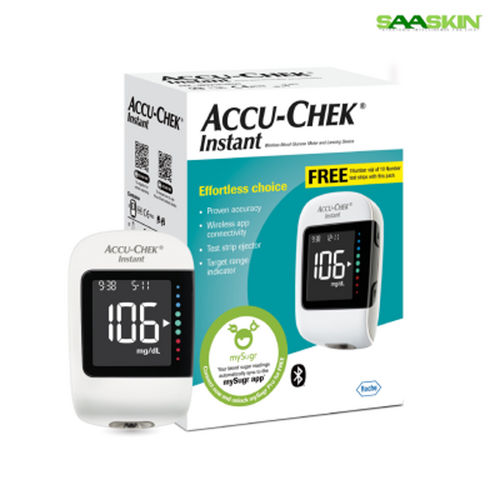
Accu-Chek Instant Glucometer Kit provides effortless Bluetooth synchronization with mySugr diabetes management app. Itis compatible with Apple and Android devices and gives a personalized logging screen. It helps to monitor your blood glucose level easily, get visual reassurance and personalize it to suit your goals with an intuitive target range indicator.
Easy-to-Read Large DisplayThe glucometer is equipped with a large LCD number display, ensuring that readings are visible and easy to interpret for users of all ages. The integrated target range indicator visually guides you, helping you quickly identify whether your blood glucose levels are within the safe zone. This intuitive layout enhances user confidence in readings.
Fast, Precise Results with Minimal BloodUtilizing electrochemical biosensor technology, results are delivered within just 4 seconds from a tiny 0.4 L blood sample. The Accu-Chek Instant also features an easy-edge test strip for hassle-free application, minimizing discomfort during testing. Its accuracy complies with stringent standards, providing dependable data for effective diabetes management.
Effortless Data Management and ConnectivityWith built-in memory for up to 720 readings, users can easily track glucose trends over time. Synchronize data to a computer via micro USB for detailed analysis or sharing with your healthcare provider. The kit includes automatic coding and clear error indicators for reliable operation, supporting seamless integration into your daily health routine.
FAQ's of Roche Accu-Chek Instant Glucometer Kit:
Q: How do I use the Accu-Chek Instant Glucometer to measure my blood glucose?
A: Simply insert an Accu-Chek Instant test strip into the meter, apply a 0.4 L blood sample to the easy-edge strip, and press the single button to start the test. Results appear on the large LCD display in just 4 seconds.
Q: What is the process for transferring my glucose readings to my computer?
A: Connect the glucometer to your computer using the micro USB port and follow the instructions in the manual to transfer and manage your readings. Up to 720 result records can be stored for ongoing tracking.
Q: When should I replace the test strips or lancets in the Accu-Chek Instant kit?
A: Test strips expire 18-24 months from the date of manufacture; always check expiration before use. Lancets should be replaced after each use for hygiene and accuracy.
Q: Where should I store the Accu-Chek Instant Glucometer and its accessories?
A: Store the meter, test strips, and accessories in a cool, dry place, away from direct sunlight. The included carry case helps protect the equipment during storage and transit.
Q: What error messages might appear on the glucometer, and what do they mean?
A: The Accu-Chek Instant displays multiple error indicators for issues such as incorrect strip insertion or abnormal results. Refer to the instruction manual for troubleshooting steps if any errors are displayed.
Q: Who can use this glucometer kit, and are there any precautions?
A: This device is suitable for adults and children; however, children should use it under medical supervision. Always consult your doctor before starting self-monitoring.
Q: What are the main benefits of using the Accu-Chek Instant Glucometer for diabetes management?
A: Key benefits include fast, accurate readings, a user-friendly LCD interface, compact portability, large memory capacity, and reliable connectivity for data analysis, making it an effective tool for consistent diabetes control.












 Accepts only Export inquiries



 Send Inquiry